claude

Claude Code Effort Levels

This is a nice dive into effort levels. It is specific to Claude Code and Opus 5.5 and Fable 5.1, but it should loosely generalise to other models too.

WHAT IS EFFORT?

At a high level, effort gives the model an approximation of how much compute you want it to spend on the task. It’s somewhat related to your modeling of the difficulty of the task.

Think of it this way, if someone asked you to do something in 12 hours straight, you might assume they just want you to do it and try very hard. If someone asked you to do the same task in 1 hour, you’d try to get them the best version that meets their task and then expect to iterate from there.

Or, you might push back and say the task requires at least 3 hours and then work for 3 hours to deliver it.

You should think of effort in the same way. Claude will always try and do your task reasonably, but higher effort will involve Claude taking more independent action for judgement and verification.

Thariq also dives into several examples, things he built, with visual examples, and also comparing how Claude performed against different tasks in the Terminal-Bench 3.0, a community-sourced benchmark using different effort levels.

Most of this seems intuitive: higher effort levels think more and solve problems better where lower effort offers lower quality output most of the time, more so on more complex tasks. But is context dependent and not always true.

One example stood out to me is that with tasks that are very well specified, performance didn’t differ that much across the different effort levels. Let’s say there is a clear spec for a large feature, if it’s well defined, using a low effort level will run a lot faster and likely still do a really good job compared to higher effort levels as less assumptions need to be made and less edge cases thought of, as the spec should cover these already. So low effort level could be a good workhorse, then use a higher effort level for adversarial and security reviews.

For regular software engineering, particularly new feature work, the effort level depends a lot on how in the loop I want to be. Low effort allows Claude to respond quickly with a starting point, higher effort levels will get more work done but Claude will also make more assumptions on my behalf.

A particularly fruitful loop for feature development I’ve been using is:

  • Give Claude a spec and ask it to interview me about any details I’m missing
  • Implement it on low effort
  • Review to make sure it got the gist of it correct, iterate on low effort as needed
  • Verify and test on high effort

Some of this is probably somewhat subjective and will vary wildly depending on context and complexity of tasks. But definitely worth more experimentation with these latest models to get a good feel for how to best utilise effort levels.

I can be a little lazy with this at times, if I have the quota available I tend to just use higher effort levels and the strongest model, usually high or xhigh for most tasks. I say lazy, but really it’s about just wanting the highest quality output first time, especially for high stakes software. I do like the idea of being able to use low effort for a much faster build with a well defined task to speed up build time, and then review and verify with say xhigh.
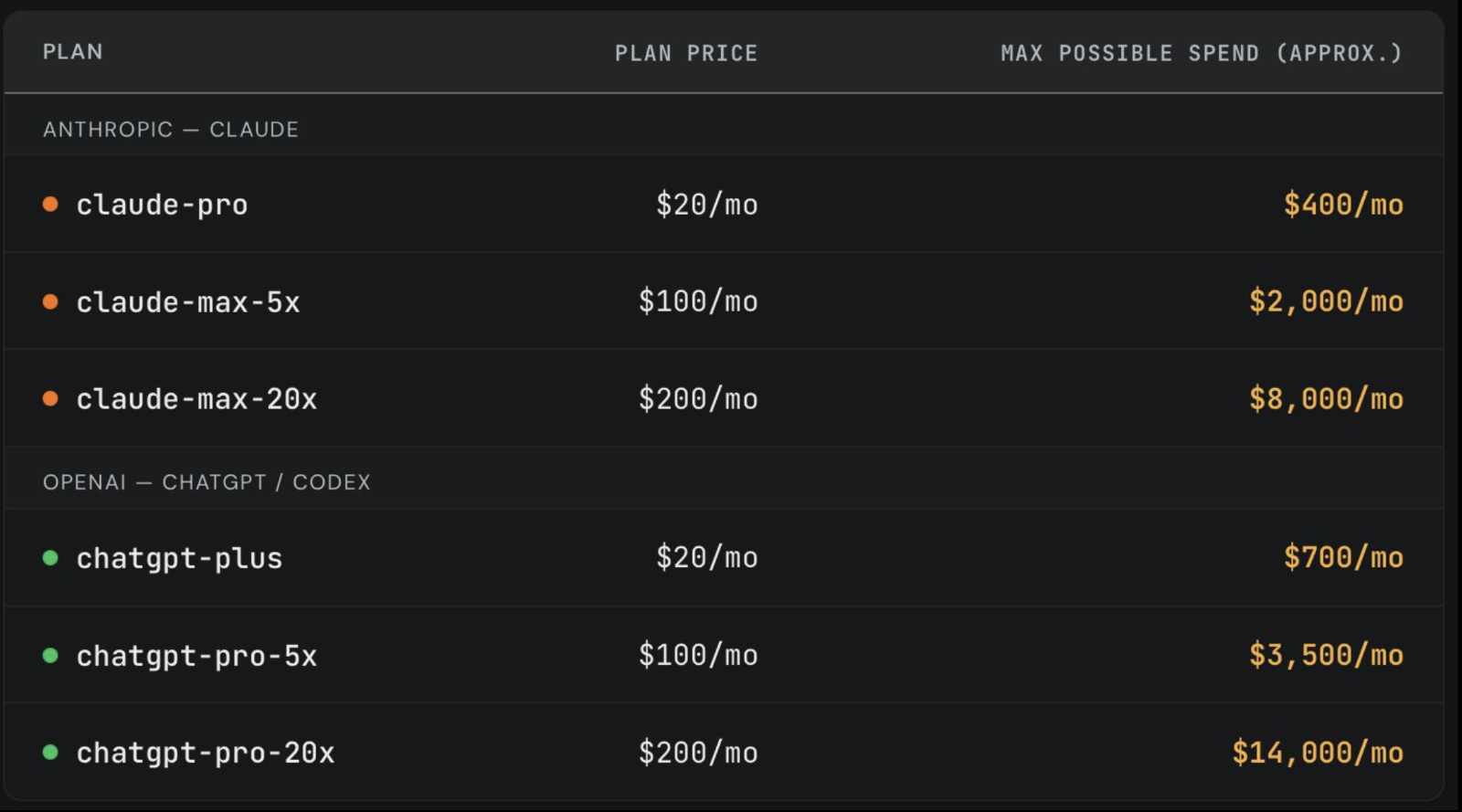
AI Subscription plans are more generous than API pricing

SemiAnalysis did a test on Anthropic/Claude subscription plans, running long horizon tasks until they maxed out.

The subscriptions are far more generous than API pricing.

AI Subscriptions vs Pricing comparison

When I first started using these tools I went the API route as my personal usage fluctuated a lot. But after a couple of months it was clear this worked out a lot more expensive and so switched to the paid plans even if not using all the quota.

Go with the paid plan.

Designing a Feature with Claude Design — Then Handing It to Claude Code

I've been wanting to give Claude Design a try. In this post I'll walk through my first use of it for designing some new functionality I wanted for my blog CMS. My use here is probably very basic, but it was an interesting exercise, and in particular I wanted to see how I could hand the design off for building.

Just a small disclaimer: I'm not a UX designer, or a creative person in general. But that's exactly why this exercise was interesting — it did a far better job than I ever could.

Getting into it...

I've recently built this blog site where this article is being read (I will write about this separately). It's very new and the feature/capability set is minimal, just enough functionality to manage, publish and serve blog content.

It has a custom-built CMS for managing the content, and supports slug-like tags that I can selectively apply to any of the content. These tags are visible to the right side of this article (or at the bottom on mobile).

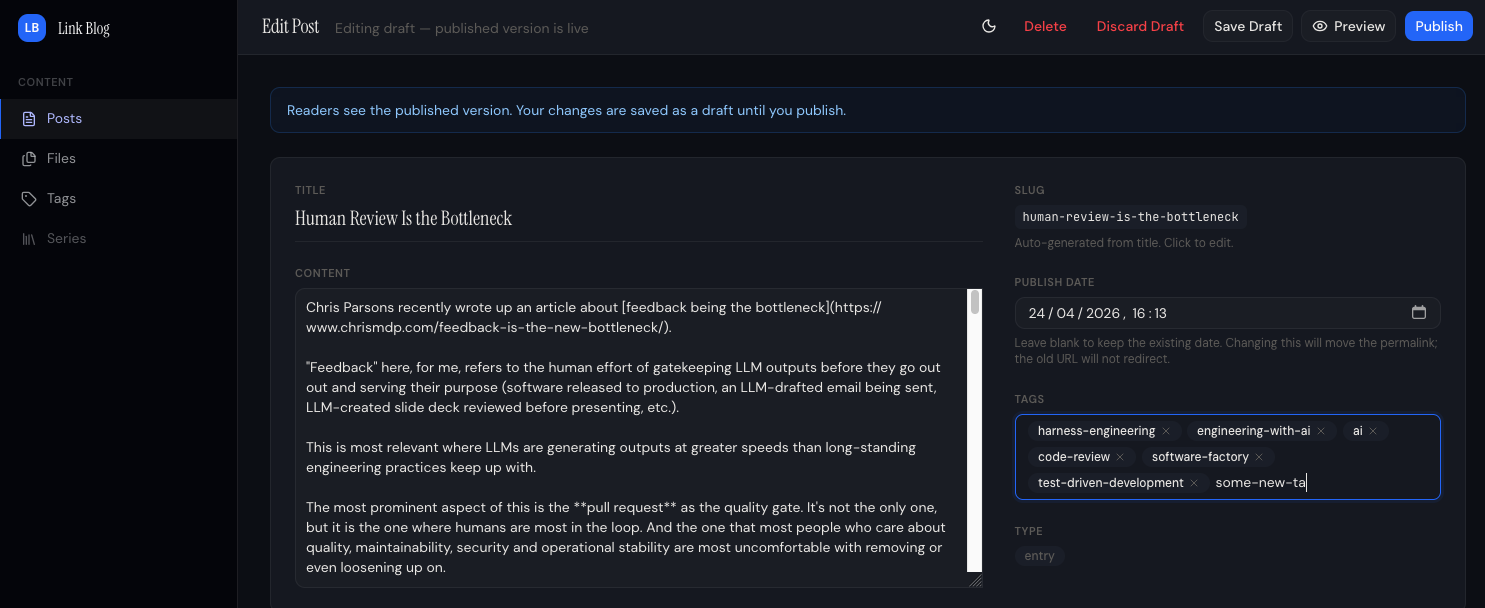
When writing or editing content, it has a section where I can add new tags or use existing ones. Below shows editing an article in the CMS I wrote recently about human reviews being a bottleneck.

Blog CMS Edit Post

The behaviour of the tags input field is: On post creation, any never-before-seen tags will be created in the tags table in the database, existing tags will be referenced.

At first sight it looks ok, but:

  • It has no option to select existing tags.
  • It doesn't indicate if a tag being added was one that already existed or would be created.
  • It doesn't help me avoid creating near-duplicate tags with a similar name or even typos.

One wouldn't want different blog articles using tags that mean the same thing but with slightly different names. For example ai-engineering and engineering-with-ai, or even a typo in the tag like ai-eginering. So without any kind of tag selection, and the behaviour of the existing tag selection and creation, this made the UX painful (I had to open the tag management section in a different tab to remember what tags were available) and susceptible to tags becoming a mess across all the content.

Using Claude Design

Claude Design was introduced on 17 April. I had had a bit of a poke around in it before to see what it was about, but this was the first chance I had to try it out on something real.

I started by pasting four screenshots of the CMS and giving it this prompt. (I used the term "upsert" for tags, which wasn't quite correct, but Claude got it).

Attached are four screenshots of my blog CMS. One is where tags are managed, show when two tags existed; ai and harness-engineering. The second one is showing where I can add a post and enter tags. How it currently works is I can enter any tag value and when the post is created/published then the app(or probably the backend for the CMS) will upsert tags.

So you can see in the third image I enter two tags, one existing and the second one (new-tag) is new, so when the blog post got created is used the existing tag and then created a the new-tag, as shown in the fourth image, where I then have a total of three tags. (Two were existing one new one got created on that new post).

I like this functionality. However, right now when I enter tags on the create post page I don't get offered to select from existing tags, so if my new post should use an existing tag I have to carefully remember or go back and look in the tags section to remember the exact name of the tag so I don't end up with near duplicated for what should be the same tag.

Ideally when I start typing for a new tag, it should show existing tags that match (like contain) the text I have entered, with the option of selecting one of those. If none match it should allow me to add a new tag.

Come up with three options for the post create screen for selecting existing or adding tags. Should be simple and seamless and easy to use.

[... 1879 words]

Higher usage limits for Claude and a compute deal with SpaceX

Anthropic partnering with SpaceX to lease their Colossus 1 data center (over 220,000 NVIDIA GPUs).

While that on it's own is interesting, the astonishing side effect of that is a sharp increase in usage limits in paid Claude plans and their APIs.

The following three changes—all effective today—are aimed at improving the experience of using Claude for our most dedicated customers.

  • First, we’re doubling Claude Code’s five-hour rate limits for Pro, Max, Team, and seat-based Enterprise plans.
  • Second, we’re removing the peak hours limit reduction on Claude Code for Pro and Max accounts.
  • Third, we’re raising our API rate limits considerably for Claude Opus models.

I think people will generally appreciate this too:

Finally, we recently made a commitment to cover any consumer electricity price increases caused by our data centers in the US. As part of our international expansion, we’re exploring ways to extend that commitment to new jurisdictions, as well as partnering with local leaders to invest back into the communities that host our facilities.

Mozilla Used Anthropic's Mythos to Fix 271 Bugs In Firefox (via Simon Willison)

Mozilla has been one of the companies to get access to Anthropic's new Mythos Preview model. And have put it to good use.

As part of our continued collaboration with Anthropic, we had the opportunity to apply an early version of Claude Mythos Preview to Firefox. This week's release of Firefox 150 includes fixes for 271 vulnerabilities identified during this initial evaluation.

Our experience is a hopeful one for teams who shake off the vertigo and get to work. You may need to reprioritize everything else to bring relentless and single-minded focus to the task, but there is light at the end of the tunnel. We are extremely proud of how our team rose to meet this challenge, and others will too. Our work isn't finished, but we've turned the corner and can glimpse a future much better than just keeping up. Defenders finally have a chance to win, decisively.

This seems to validate a lot of Anthropic's claims about the new model's capabilities. And it's encouraging to know that this will likely soon be available to the general public, at some point, where they can be used to strengthen the security postures of existing and new systems.

When that eventually happens, people are going to need to act fast to find and resolve security vulnerabilities before bad actors get a chance to exploit them.

There will be casualties.